IGNOU assignment result is an important part of the evaluation process for students enrolled in Indira Gandhi National Open University. After submitting assignments for a particular semester or term-end examination, students often want to know whether their assignments have been evaluated and whether the marks have been updated in the university records.
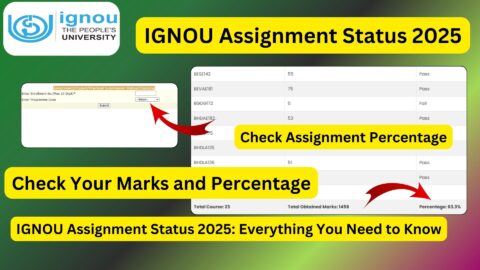
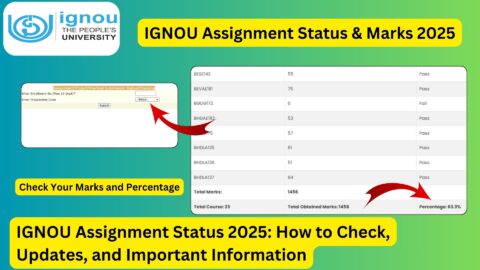
IGNOU students can check their assignment marks and transmission status online through the official assignment status portal. The university provides an online facility where students can enter their enrollment number and programme code to check the available assignment, project, practical awards, or marks transmission status.
The IGNOU assignment status page explains that the status is reflected only after marks or grades have been transmitted by the concerned Study Centre or Regional Centre following the evaluation process.
What Is IGNOU Assignment Result?
IGNOU assignment result refers to the marks or grades awarded to a student for assignments submitted as part of their academic programme. Assignments are an important component of many IGNOU programmes and contribute to the student’s overall academic evaluation.
After students submit their assignments, the concerned Study Centre or Regional Centre handles the evaluation and transmission of marks. Once the marks are processed and transmitted to the university system, students can check the available status online.
It is important to understand that assignment marks may not appear immediately after submission. There can be a gap between assignment submission, evaluation, transmission of marks, and updating of the online system.
Therefore, students should not be concerned if their assignment result is not displayed immediately after submitting an assignment.
IGNOU Assignment Result 2026: Important Information
The following table provides some important information related to checking the IGNOU assignment result and status.
| Information | Details |
|---|---|
| University | Indira Gandhi National Open University |
| Assignment Result | IGNOU Assignment Marks/Status |
| Official Status Portal | https://isms.ignou.ac.in/changeadmdata/StatusAssignment.asp |
| Details Required | Enrollment Number and Programme Code |
| Enrollment Number | Maximum 10 digits |
| Status Available For | Assignment/Project/Practical Awards/Marks Transmission |
| Result Availability | After marks/grades are transmitted |
| Evaluation | Concerned Study Centre/Regional Centre |
| Website Type | IGNOU Online Status Portal |
| Useful For | Checking assignment marks/status |
The official status page specifically asks students to enter their enrollment number and select the programme code to check the available status.
How to Check IGNOU Assignment Result 2026?
Students can follow a few simple steps to check their IGNOU assignment result online.
Step 1: Visit the Assignment Status Portal
First, open the IGNOU assignment status page: https://isms.ignou.ac.in/changeadmdata/StatusAssignment.asp
This is the page used for checking the assignment, project, and practical marks transmission status.
Step 2: Enter Your Enrollment Number
On the page, enter your IGNOU enrollment number in the required field.
Make sure that you enter the correct enrollment number. The portal indicates that the enrollment number can contain a maximum of 10 digits.
Students should carefully check the number before submitting the form because an incorrect enrollment number can prevent the correct record from being displayed.
Step 3: Select Your Programme Code
After entering the enrollment number, select the appropriate programme code from the available options.
For example, students enrolled in different undergraduate, postgraduate, diploma, certificate, or other IGNOU programmes need to select the programme corresponding to their enrollment.
Choosing the correct programme code is important because the assignment record is associated with the student’s programme.
Step 4: Submit the Details
After entering the required information, submit the form.
The portal will process the information and display the assignment or marks transmission status available in the university’s records.
Step 5: Check Your Assignment Status
If your assignment marks have already been evaluated and transmitted, the relevant information may appear on the screen.
If the marks are not available yet, students may need to wait until the concerned Study Centre or Regional Centre completes the evaluation and transmission process.
What Does IGNOU Assignment Status Mean?
Students may see different types of information depending on the stage of processing.
The most important thing to remember is that assignment marks are generally not displayed immediately after submission.
The official IGNOU status page states that the status will be reflected only when marks or grades have been transmitted by the Study Centres or Regional Centres after the evaluation process.
This means there are several stages involved:
- Student prepares the assignment.
- Student submits the assignment according to the applicable instructions.
- Assignment reaches the concerned Study Centre or other designated authority.
- Assignment is evaluated.
- Marks or grades are transmitted.
- The information becomes available in the online status system.
Because of these stages, students should allow sufficient time for their assignment marks to be updated.
Why Is My IGNOU Assignment Result Not Showing?
One of the most common questions students ask is why their assignment result or marks are not appearing online.
There can be several reasons.
Assignment Has Not Been Evaluated
The assignment may have been submitted successfully, but evaluation may still be pending.
Submitting an assignment does not necessarily mean that marks will immediately appear online.
Marks Have Not Been Transmitted
According to the official IGNOU assignment status page, the status is reflected after marks or grades have been transmitted by the Study Centre or Regional Centre following evaluation.
Therefore, even if the assignment has already been evaluated, the online status may take additional time to appear if the marks have not yet been transmitted.
Assignment Submission Record Is Being Processed
In some cases, there can be a delay between submission and the updating of university records.
Students should keep their assignment submission proof, receipt, acknowledgment, or other relevant evidence until the assignment process is fully completed.
Incorrect Enrollment Number
Students should also make sure that they are entering the correct enrollment number.
The assignment status portal requires the enrollment number to retrieve the relevant student record.
Incorrect Programme Code
Selecting the wrong programme code can also prevent the expected information from being displayed.
Students should select the programme code associated with their current IGNOU programme.
Does IGNOU Assignment Result Affect the Grade Card?
Yes, assignment marks are an important part of the academic evaluation process and can contribute to the overall academic record.
However, students should understand that the assignment status page and the IGNOU grade card are separate systems or stages of information.
The assignment status portal is specifically useful for checking assignment, project, practical awards, and marks transmission information. The grade card provides a broader academic record containing information about different components of the student’s programme.
Therefore, students should check both the assignment status and grade card when monitoring their academic progress.
If assignment marks have been updated in the assignment status system but are not yet visible in the grade card, students may need to allow additional time for the information to be incorporated into the relevant academic record.
How Long Does It Take for IGNOU Assignment Marks to Appear?
There is no single fixed time that applies to every student, programme, Study Centre, or examination cycle.
The timing can depend on several factors, including:
- Date of assignment submission
- Assignment evaluation schedule
- Workload at the Study Centre
- Transmission of marks
- Regional Centre processing
- University data updating
- Programme and semester
- Examination cycle
Therefore, students should not assume that their assignment marks will appear immediately after submission.
The official IGNOU portal makes it clear that the status becomes available after the marks or grades are transmitted following the evaluation process.
What Should I Do If My Assignment Marks Are Missing?
If you have submitted your assignment but the result is not appearing, first verify that you entered the correct enrollment number and programme code.
You should also keep your assignment submission proof.
If sufficient time has passed and your marks are still missing, you can contact the concerned Study Centre or Regional Centre and provide relevant details such as:
- Enrollment number
- Programme code
- Course code
- Assignment submission date
- Assignment submission proof
- Study Centre details
- Semester or examination cycle
Keeping proof of submission is particularly useful if you need to raise a query about missing assignment marks.
IGNOU Assignment Result and December TEE
Students appearing for the December Term-End Examination should pay attention to their assignment submission and evaluation status.
Assignments are an important academic requirement for many IGNOU courses. Students should submit the required assignments within the applicable deadline and retain proof of submission.
After submission, students can periodically check the assignment status portal to see whether their marks or grades have been transmitted.
Students should also check their grade card separately after the relevant information is updated.
IGNOU Assignment Result and June TEE
The same general process applies to students preparing for the June Term-End Examination.
Students should ensure that the assignments applicable to their courses have been completed and submitted according to IGNOU’s requirements.
After evaluation and transmission of marks, students can use the assignment status portal to check the available information.
It is advisable not to wait until the last moment to check academic records. Regularly checking the relevant IGNOU portals can help students identify missing information earlier.
Important IGNOU Links
The following links can be useful for students checking assignment and other academic information.
| Purpose | Link |
|---|---|
| Check IGNOU Assignment Result/Status | https://isms.ignou.ac.in/changeadmdata/StatusAssignment.asp |
| IGNOU Assignment Downloads | https://www.ignou.ac.in/studentService/download/assignments |
| IGNOU Grade Card | https://www.ignoubank.com/ignou-grade-card/ |
| IGNOU Study Material Status | https://www.ignoubank.com/ignou-book-status/ |
| IGNOU Admission Status | https://isms.ignou.ac.in/changeadmdata/AdmissionStatusNew.ASP |
| IGNOU Assignment Status | https://isms.ignou.ac.in/changeadmdata/StatusAssignment.asp |
| IGNOU Grievance Portal | https://igram.ignou.ac.in/ |
Students should always enter their information carefully when using IGNOU online services.
Tips for IGNOU Students
Students can follow some simple practices to avoid problems related to assignment results.
First, always keep a copy of every assignment submitted to IGNOU.
Second, keep the assignment submission receipt or acknowledgment safely.
Third, note down the date on which each assignment was submitted.
Fourth, keep a list of the course codes for which assignments were submitted.
Fifth, periodically check the assignment status portal after the evaluation period.
Finally, compare the assignment information with the grade card once the relevant marks become available.
These records can be useful if a student needs to contact the Study Centre, Regional Centre, or university regarding missing marks.
FAQ about IGNOU Assignment Result 2026
What is the IGNOU assignment result?
IGNOU assignment result refers to the marks or grades associated with assignments submitted by students. The assignment status portal can also display information related to project and practical awards or marks transmission.
Where can I check my IGNOU assignment result?
You can check the IGNOU assignment result and marks transmission status through:
https://isms.ignou.ac.in/changeadmdata/StatusAssignment.asp
What details are required to check IGNOU assignment status?
The portal requires the student’s enrollment number and programme code. The official page specifies an enrollment number field with a maximum of 10 digits.
Why is my IGNOU assignment result not showing?
Your assignment may still be awaiting evaluation or the marks may not yet have been transmitted by the concerned Study Centre or Regional Centre. The official portal states that the status is reflected after marks or grades are transmitted following the evaluation process.
Can I check assignment marks without an enrollment number?
The assignment status portal requires an enrollment number to retrieve the relevant student record, so you should keep your enrollment number available when checking the result.
Does assignment submission mean that marks will appear immediately?
No. Assignment submission, evaluation, transmission of marks, and updating of the online system are separate stages. The marks may take time to become visible.
What should I do if I submitted my assignment but the marks are missing?
First, verify your enrollment number and programme code. If the marks are still unavailable after the evaluation and transmission process, keep your submission proof and contact the appropriate Study Centre or Regional Centre for assistance.
Can I check project and practical marks through the same portal?
The IGNOU status page is titled “Assignment/Project/Practical Awards/Marks Transmission Status,” so the portal can be used for the relevant information available for these categories.
Is IGNOU assignment result the same as the grade card?
No. Assignment status and the grade card serve different purposes. Assignment status focuses on assignment, project, practical awards, and marks transmission, while the grade card provides a broader academic record.
Should I keep my assignment submission receipt?
Yes. Students should keep their assignment submission proof until the marks have been properly updated and their academic records are complete.
Conclusion
IGNOU assignment result is an important part of the academic evaluation process for students. After submitting assignments, students can check whether their assignment marks or grades have been transmitted through the IGNOU assignment status portal.
To check your assignment result, visit: https://isms.ignou.ac.in/changeadmdata/StatusAssignment.asp
Enter your enrollment number and select the appropriate programme code. If the result is not available, it does not necessarily mean that your assignment was not submitted successfully. The official IGNOU portal states that the status is reflected after marks or grades are transmitted by the Study Centre or Regional Centre following the evaluation process.
Students should therefore keep their assignment submission proof, regularly check the status, and allow sufficient time for evaluation and marks transmission. Once the assignment marks are updated, students can also monitor their IGNOU grade card to ensure that their academic records are updated properly.